

GPS Receiver (GNSS 4500)#
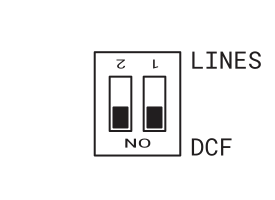
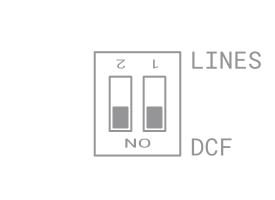
Configure the DIP switch to DCF positon.
See also
To configure DIP switch position, you need to dismount the front plexiglass. See Cable Connection chapter.
Note
It is important to switch both positions to
ON(DCF).Set following items:
In the SYNC menu, set item o1 to value A (see Timezone of Synchronization Source chapter)
In the SYNC menu, set item o2 to value A (see Type of Synchronization chapter)
In the dISP menu, set item d2 to your desired time zone (see Timezone of Time and Date chapter)
Connect GPS receiver (GNSS 4500) to the LINES IN connector on back side of the recess. Connect yellow and green cable to external power supply.
Attention
Please note the correct polarity of the wires – see the GPS user manual.
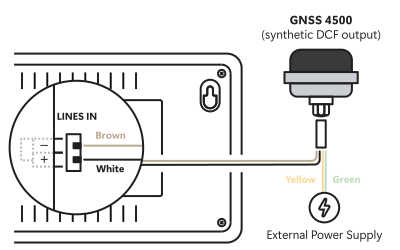
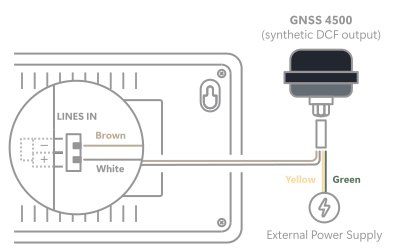
For the correct placing of the receiver please follow the GPS user manual.
Presuming the good position of the GPS receiver (GNSS 4500) the synchronization takes place in approx. 10 to 20 minutes. The green LED diode lights up.